




Why supporting 100 languages is hard
AI voice technology works great in English. But language doesn’t stop there.
Voice dictation should feel universal. You should be able to think out loud in your own language (whether it’s Spanish, Hindi, Thai, French) and see your words appear instantly and naturally on screen.
At Wispr Flow, we’re building toward that goal: natural, accurate voice-to-text in 100+ languages. It may sound simple, but it’s one of the hardest technical challenges in AI.
Each language has its own quirks
Every language has its own rhythms, conventions and nuances that can completely confuse a speech-to-text system if it’s not designed for them. For example:
- 🇪🇸 Spanish drops letters like it’s in a hurry (sobrado → sobrao), mashes words together (me ha escrito → ma escrito), and is roughly 20 % wordier than English.
- 🇮🇹 Italian needs intonation or context to differentiate yes-no
- questions (Hai fame?) from statements (Hai fame.)
- 🇫🇷 French requires spaces before punctuation (; ? !) — without them, text looks off.
- 🇩🇪 German uses „these“ quotation marks instead of “these.”
These details might seem minor, but they’re the difference between dictation that’s technically correct and dictation that feels human.
Each speaker is unique
Roughly 50% of people speak more than one language in their day-to-day life. Different combinations of languages introduce unique accents, code-switching, and stylistic preferences that blur language boundaries, making it tricky for models to identify the intended language.
- 🇮🇳 Hindi speakers typically favor the Devanagari script, but prefer a romanized script when speaking Hinglish (a fluid blend of Hindi and English).
- 🇹🇭 English→Thai loanwords (meeting, computer) are pronounced with Thai phonetics and tone.
- 🗣️ Strong accents can trick a model into thinking you’re speaking another language entirely.
Our idiolects (personal combinations of languages and dialects) challenge speech-to-text systems—but they’re also what make us who we are.
How Flow handles it
Here’s what happens behind the scenes every time you speak to Flow:
- Different transcription engines for different languages: Our research found that some standard speech models perform poorly on languages like Hindi, Marathi, Thai, and Tamil. Flow dynamically selects the most accurate ASR (Automatic Speech Recognition) engine for each language, cutting transcription error rates by more than half in internal testing.
- Fine-tuned formatting models: Flow’s formatter learns from real user edits (punctuation, spacing, and grammar corrections) so your text looks the way you would write it. This includes learning regional email conventions, list structures, and even greeting styles.
- Accent-aware processing: Flow uses “accent confidence scoring” to compare multiple transcriptions and choose the most likely match. This prevents your English from being mistaken for German, or your Spanish for Portuguese. Accuracy can still decrease with very strong or mixed accents, but Flow is improving with each release, as we train on a more diverse range of voices.
- Ongoing code-mixing experiments: For Hinglish speakers, Flow now outputs romanized Hindi (“tum kya kar rahe ho”) correctly without switching scripts, paving the way for better mixed-language support across other regions.
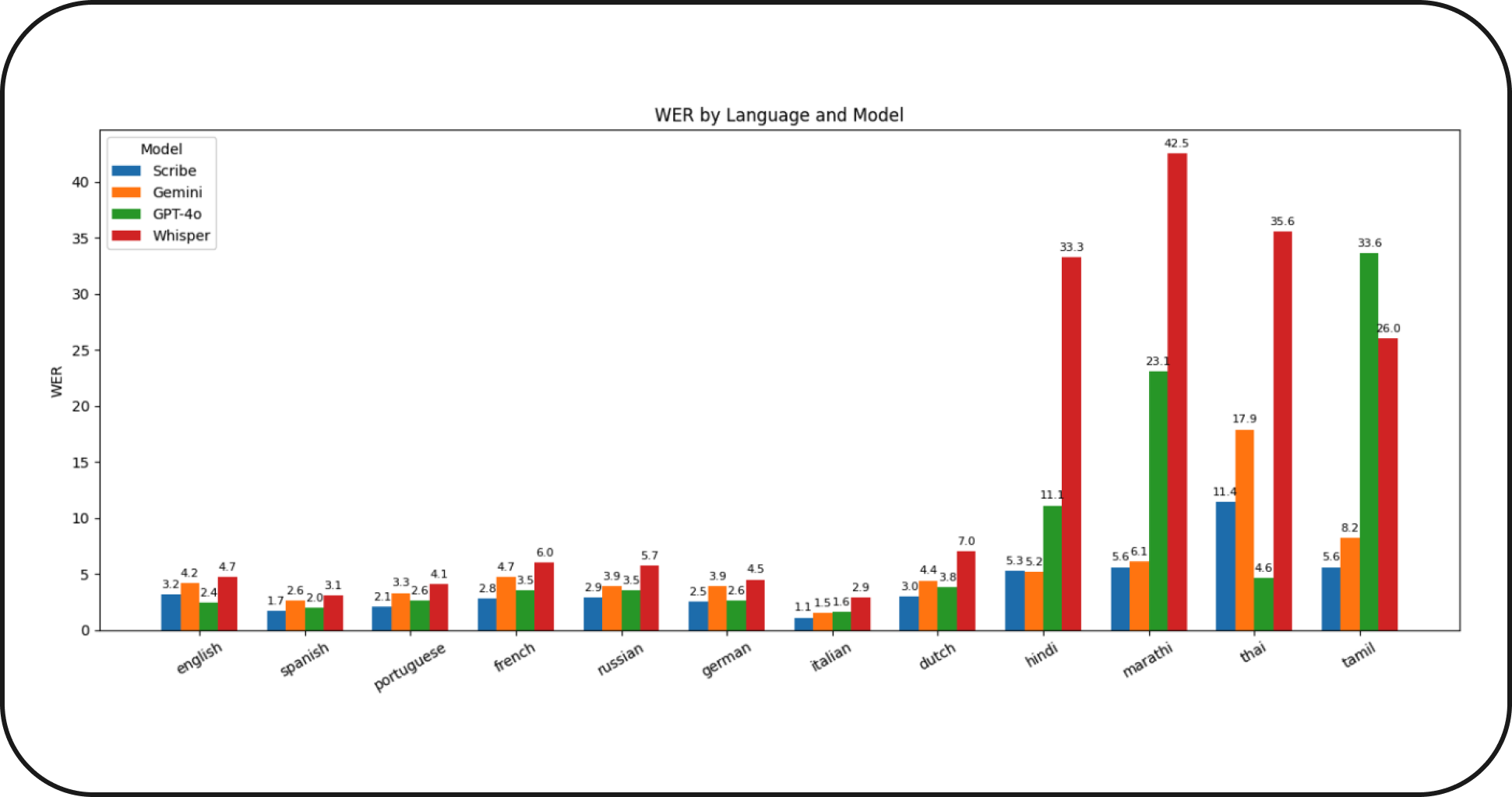
Newer automatic speech recognition models like Scribe and Gemini drastically outperform OpenAI’s Whisper in Asian languages when measured by WER (word error rate.) Wispr Flow uses an ensemble of speech recognition models to provide best-in-class accuracy across over 100 languages.
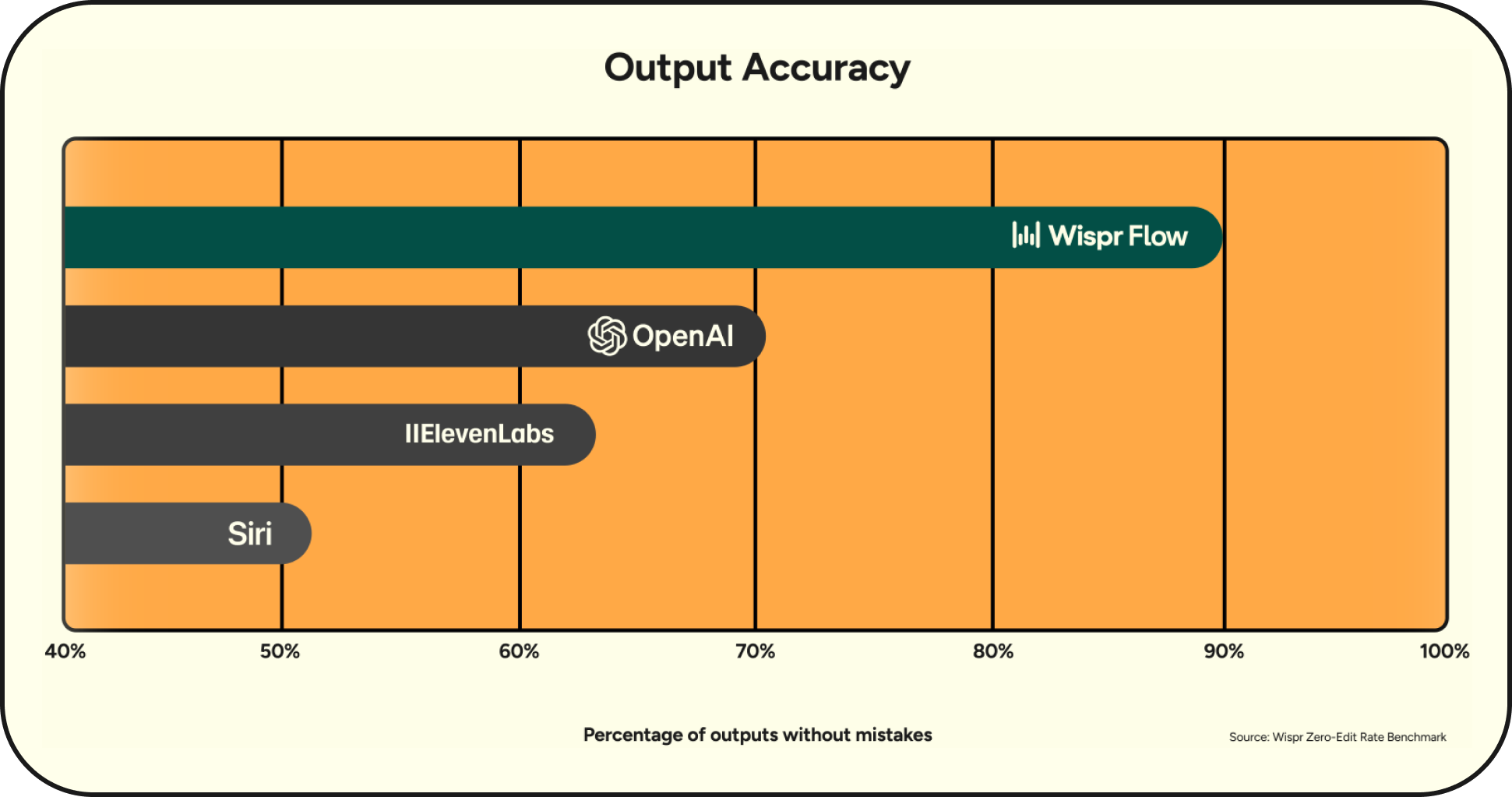
Why this work matters
Multilingual accuracy isn’t just a technical milestone. It’s about accessibility, inclusion, and identity.
- In Latin America, voice notes are a default way to communicate. Dictating with Flow makes those messages easier to read and faster to reply to.
- In languages with character-based scripts like Mandarin and Thai, Flow makes typing up to four times faster than tapping through characters.
- For professionals on global teams, dictating in your native language lets you think clearly without switching mental gears.
Our goal is simple: make Flow as effortless and natural in every language as it is in English.
Try it for yourself
You can use Flow in over 100 languages, instantly. No setup or integration required. Here’s how to try it:
- Open Flow on your Mac, Windows, or iPhone.
- You can allow Flow to auto-detect the language you are speaking, but for best accuracy, we recommend manually selecting your languages. Just go to Settings → General → Languages.
- Start dictating. Flow will handle the rest.
Flow now delivers fast, accurate, and natural transcription in:
- 🇫🇷 French (Français)
- 🇩🇪 German (Deutsch)
- 🇮🇳 Hindi (हिन्दी)
- 🇮🇹 Italian (Italiano)
- 🇵🇹 Portuguese (Português)
- 🇪🇸 Spanish (Español)
- 🇹🇭 Thai (ไทย)
- Each of these languages has been trained and tuned to match English-level performance in speech recognition.
- Lists and emails format correctly, and your personal terms sync seamlessly to your dictionary, just as they do in English.
- We’re continuing to improve language-specific formatting to make every last dot and quotation look perfectly native.
Flow also supports accurate dictation in dozens of other major languages, including:
- 🇦🇪 Arabic (العربية)
- 🇨🇳 Cantonese (粵語)
- 🇳🇱 Dutch (Nederlands)
- 🇮🇱 Hebrew (עברית)
- 🇮🇩 Indonesian (Bahasa Indonesia)
- 🇯🇵 Japanese (日本語)
- 🇰🇷 Korean (한국어)
- 🇨🇳 Mandarin (中文)
- 🇵🇱 Polish (Polski)
- 🇷🇺 Russian (Русский)
- 🇸🇪 Swedish (Svenska)
- 🇹🇷 Turkish (Türkçe)
- 🇺🇦 Ukrainian (Українська)
- 🇻🇳 Vietnamese (Tiếng Việt)
- … and 75+ others.

