

14 best productivity apps every entrepreneur should have on their phone

An entrepreneur wears many hats. Between managing clients, overseeing employees, handling administrative work, and growing the business, there's rarely a shortage of things demanding their attention. Moreover, an entrepreneur works nontraditional hours in nontraditional environments. This all means that the right suite of productivity apps can make all the difference.
The 14 best productivity apps for entrepreneurs
1. Todoist: Best for managing competing business priorities and deadlines
What Todoist does: Todoist helps entrepreneurs organize tasks, deadlines, and recurring responsibilities. Tasks can be grouped into projects, prioritized, and assigned to team members. Its mobile app also includes Ramble, which converts spoken instructions into tasks.
Cost: Free plan available. Pro starts at $5/month with annual billing or $7/month with monthly billing.
Does it offer a business plan? Yes. Todoist Business starts at $8/user/month billed annually, with shared workspaces, permissions, and centralized billing.
App features entrepreneurs will like:
- Recurring tasks: Schedule responsibilities like paying invoices or renewing contracts.
- Priority levels: Distinguish urgent work from lower-priority responsibilities.
- Ramble: Dictate tasks when typing isn't practical.
- Calendar integration: View tasks alongside scheduled appointments.
- Shared projects: Assign responsibilities and monitor progress.
- Natural language scheduling: Create deadlines using phrases like "follow up with client next Thursday."
2. Wispr Flow: Best for AI meeting notes and dictation on the go
What Wispr Flow does: Wispr Flow combines an AI meeting Notetaker with voice dictation, giving entrepreneurs two ways to capture information without spending time typing. It's particularly useful for entrepreneurs who move between client meetings, jobsites, and other nontraditional working environments.
Wispr Flow Notetaker records meetings and generates transcripts, summaries, and action items. It identifies different speakers and lets entrepreneurs ask questions about previous conversations, making it easier to retrieve client requirements, decisions, or commitments without searching through recordings. It also helps remote teams share meeting decisions with colleagues who couldn't attend. Notetaker is available on desktop and iPhone.
Wispr Flow dictation works across compatible apps on iPhone, Android, Mac, and Windows. Entrepreneurs can speak emails, messages, instructions, and longer documents directly into text fields. Flow adds punctuation, removes filler words, and cleans up spoken corrections, making it useful for drafting business emails by voice.
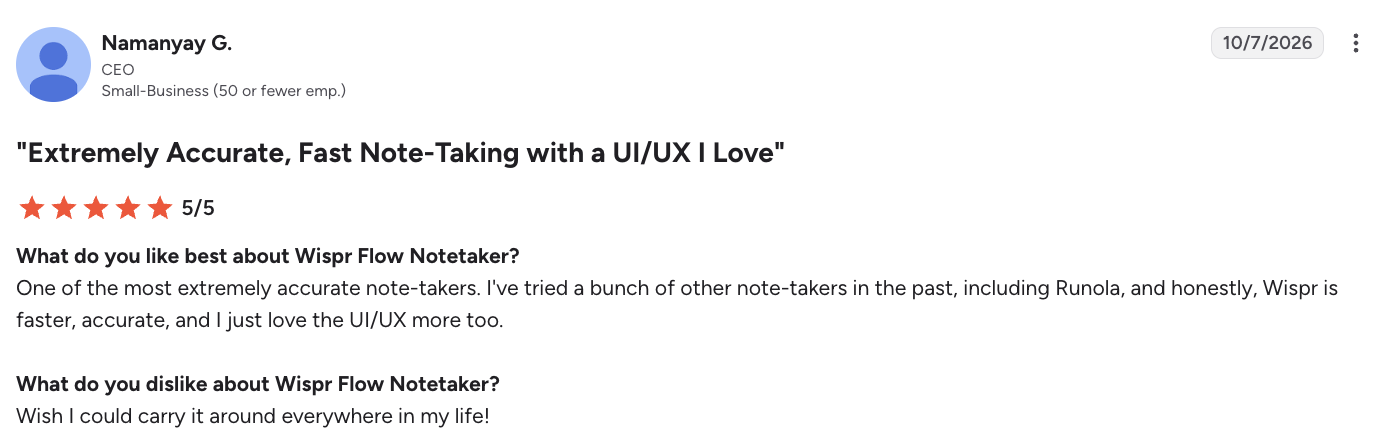
In a G2 review, small-business CEO Namanyay G. gave Wispr Flow 5/5 stars. He praised the app's speed, accuracy, and interface compared with other tools he'd tried.
Cost: Free plan with usage limits. Pro costs $15/month or $12/month billed annually.
Does it offer a business plan? Yes. Growth starts at $18/user/month with annual billing for team dictation features, with additional charges for expanded Notetaker functionality. Enterprise plans are also available.
App features entrepreneurs will like:
- AI meeting notes: Generate transcripts, summaries, and action items from recorded conversations.
- Ask Notetaker: Search meeting information and ask questions about previous discussions.
- Speaker identification: Distinguish participants in meeting transcripts.
- Cross-app dictation: Compose emails, texts, and documents by speaking.
- Automatic editing: Clean up punctuation, filler words, and spoken corrections.
- Personal dictionary: Improve recognition of company names and industry terminology.
3. Trainual: Best for training employees and documenting business processes
What Trainual does: Trainual helps entrepreneurs document procedures, policies, and employee training materials. Employees can search instructions and complete training through the mobile app, reducing their dependence on the owner for routine questions. Creating new training content generally requires a desktop browser.
Cost: Custom pricing for Core, Pro, Premium, and Enterprise plans.
Does it offer a business plan? Yes. Trainual is designed for teams, with advanced training paths, reporting, and administrative controls available on higher tiers.
App features entrepreneurs will like:
- Mobile knowledge base: Make company procedures available to employees in the field.
- Role-based training: Assign materials according to job responsibilities.
- Progress tracking: Monitor employee training completion.
- Searchable procedures: Help staff find answers independently.
- Knowledge verification: Test employee understanding of documented processes.
4. Calendly: Best for reducing the back-and-forth of scheduling
What Calendly does: Calendly lets clients and prospects book appointments directly into available calendar slots. Entrepreneurs control meeting types, booking hours, and buffers between appointments, while the mobile app provides access to bookings and scheduling links.
Cost: Free plan available. Standard costs $10/user/month billed annually.
Does it offer a business plan? Yes. Teams starts at $16/user/month billed annually, with round-robin scheduling, lead routing, and team controls. Enterprise plans are available.
App features entrepreneurs will like:
- Booking links: Let prospects schedule calls without email coordination.
- Calendar syncing: Prevent double bookings.
- Availability rules: Restrict appointments to designated hours.
- Automated reminders: Reduce missed appointments.
- Team scheduling: Route meetings to available employees.
5. Spark Mail: Best for prioritizing business emails across multiple inboxes
What Spark Mail does: Spark Mail combines multiple email accounts and prioritizes important messages. Its Smart Inbox separates personal correspondence from newsletters and notifications. Entrepreneurs can snooze emails, set follow-up reminders, and use AI tools to summarize conversations or draft replies.
Cost: Free plan available. Plus starts at $8.25/user/month billed annually; Pro starts at approximately $16.58/user/month billed annually.
Does it offer a business plan? Yes. Paid plans include collaboration features, with additional Enterprise controls.
App features entrepreneurs will like:
- Unified inbox: Access business and personal accounts in one place.
- Priority senders: Highlight messages from key clients and partners.
- Gatekeeper: Screen unfamiliar senders.
- Snooze and reminders: Return to messages when action is required.
- AI assistance: Summarize lengthy threads and prepare replies.
6. Driversnote: Best for automatically tracking business mileage
What Driversnote does: Driversnote automatically records trips using a smartphone's GPS. Entrepreneurs can classify drives as business or personal and export mileage reports for reimbursement or tax records.
Its optional iBeacon, a small Bluetooth device kept in the vehicle, helps distinguish trips made in that car from other travel.
Cost: Free plan allows reporting for up to 15 trips per month. Pro costs $11/month.
Does it offer a business plan? Yes. Teams starts at $11/license/month, with custom pricing for larger organizations.
App features entrepreneurs will like:
- Automatic detection: Record trips without starting a timer.
- Trip classification: Separate business and personal mileage.
- iBeacon: Associate tracking with a particular vehicle.
- Mileage reports: Export records for accounting or reimbursement.
- Team administration: Manage mileage records across employees.
7. Motion: Best for optimizing calendars and automatically rescheduling work
What Motion does: Motion is an AI productivity app that schedules tasks around existing meetings. Entrepreneurs enter deadlines, priorities, and estimated task durations; Motion allocates calendar time accordingly and reorganizes the schedule when commitments change.
Cost: Pro AI starts at $19/user/month billed annually.
Does it offer a business plan? Yes. Business AI starts at $29/user/month billed annually, with capacity planning, reporting, and team permissions.
App features entrepreneurs will like:
- AI task scheduling: Allocate calendar time to assignments.
- Dynamic rescheduling: Rearrange work when appointments change.
- Deadline management: Plan work around due dates.
- Calendar integration: Combine meetings and independent work.
- Capacity planning: Identify overloaded employees on eligible plans.
- Priority-based planning: Give more important commitments precedence.
8. Quo: Best for separating business and personal communications
What Quo does: Quo, formerly OpenPhone, provides a dedicated business number without requiring a second device. Calls, texts, and voicemails stay in a separate mobile inbox. Entrepreneurs can configure business hours, route calls, and eventually share customer conversations with employees.
In a G2 review, small-business owner Mike W. gave Quo 5/5 stars. He uses it to manage two businesses from one device and values its mobile-desktop access, although he found some initial settings difficult to configure.

Cost: Starter costs $19/user/month or $15/user/month billed annually.
Does it offer a business plan? Yes. Business costs $33/user/month or $23/user/month billed annually, adding call transfers, phone menus, and AI call summaries.
App features entrepreneurs will like:
- Second number: Separate customer communications from personal calls.
- Business-hours controls: Manage calls outside working hours.
- Shared inboxes: Let employees handle customer messages.
- Voicemail transcription: Read messages without playing recordings.
- Call routing: Direct inquiries to the appropriate employee.
- Cross-device access: Review conversations from a phone or computer.
9. Readwise Reader: Best for organizing industry research and saved resources
What Readwise Reader does: Readwise Reader collects articles, newsletters, PDFs, and ebooks into a searchable reading library. Entrepreneurs can highlight findings from industry publications and competitor research, then retrieve them when making business decisions. Its mobile app also includes text-to-speech.
Cost: 30-day free trial. Subscription costs $9.99/month billed annually or $12.99/month billed monthly.
Does it offer a business plan? No dedicated team plan is advertised.
App features entrepreneurs will like:
- Save for later: Collect research without interrupting work.
- Newsletter management: Keep industry reading out of the email inbox.
- Text-to-speech: Listen to saved materials.
- Highlights: Preserve findings for later reference.
10. Toggl Track: Best for tracking billable hours and project profitability
What Toggl Track does: Toggl Track records time spent on client work, projects, and internal tasks. Entrepreneurs can compare recorded hours with project revenue to identify underpriced services or excessive administrative work. The mobile app handles time entry; advanced reporting is available through the web version.
Cost: Free for up to three users. Starter costs $9/user/month billed annually; Premium costs $16/user/month billed annually.
Does it offer a business plan? Yes. Paid plans include billable rates, profitability reporting, and workload management. Enterprise options are available.
App features entrepreneurs will like:
- One-tap timers: Record billable work from a phone.
- Project categorization: Separate time by client or assignment.
- Time reports: Identify labor-intensive activities.
- Billable rates: Compare recorded hours against billing rates.
- Profitability reporting: Assess project margins.
11. TextExpander: Best for automating repetitive messages and business communications
What TextExpander does: TextExpander converts short abbreviations into saved messages, links, and instructions. Snippets can contain customizable fields, helping entrepreneurs reuse standard communication while personalizing important details.
Its iPhone and iPad keyboard inserts snippets into compatible apps.
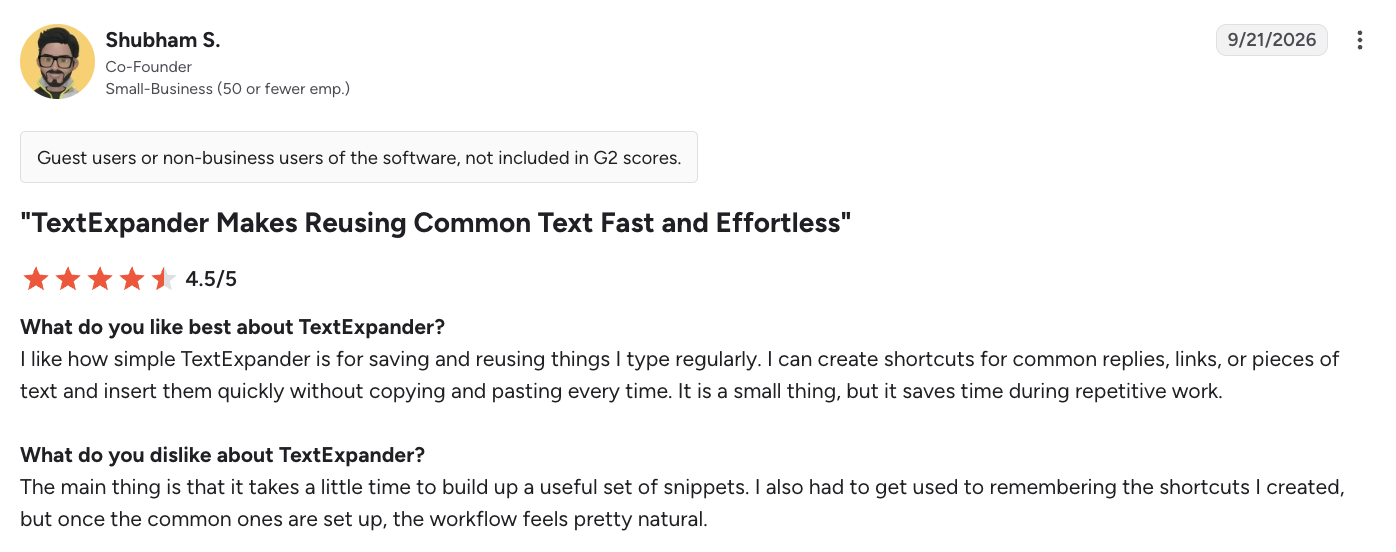
In a G2 review, small-business co-founder Shubham S. rated TextExpander 4.5/5 stars. He praised the time saved on recurring responses and links while acknowledging the initial effort of building and learning a snippet library.
Cost: Free plan with limited snippets. Pro starts at $5/user/month billed annually.
Does it offer a business plan? Yes. Business starts at $10/user/month billed annually, with shared snippet libraries and collaboration tools.
App features entrepreneurs will like:
- Text shortcuts: Insert standard responses with abbreviations.
- Dynamic fields: Personalize templates.
- Shared libraries: Give employees approved messaging.
- Cross-device syncing: Access snippets on supported devices.
- Consistent messaging: Reduce errors in recurring communications.
12. Pumble: Best for centralizing team messages and project discussions
What Pumble does: Pumble combines team messaging, project channels, file sharing, and video meetings. Entrepreneurs can keep discussions organized by client or department and search previous conversations instead of repeatedly requesting information.

In a G2 review, Radha R., a management trainee at a mid-market organization, rated Pumble 4.5/5 stars. The reviewer praised its search, document sharing, and video conferencing capabilities, including inviting external participants without requiring accounts.
Cost: Free plan available. Pro starts at $2.49/user/month billed annually.
Does it offer a business plan? Yes. Business starts at $3.99/user/month billed annually, with additional permissions and guest access. Enterprise plans are available.
App features entrepreneurs will like:
- Project channels: Organize client and internal conversations.
- Unlimited message history: Search older discussions.
- File sharing: Keep documents alongside project messages.
- Video meetings: Communicate without separate meeting software.
- Guest collaboration: Include outside partners on eligible plans.
13. Canva: Best for producing branded marketing assets from a phone
What Canva does: Canva provides templates and editing tools for social graphics, presentations, flyers, and videos. Entrepreneurs can produce promotional materials from their phones, reuse established designs, and maintain consistent branding.
Cost: Free plan available. Canva Pro costs $144/year for one person.
Does it offer a business plan? Yes. Canva Business costs $250/user/year, with brand management and collaboration features. Enterprise plans are available.
App features entrepreneurs will like:
- Templates: Create marketing materials without starting from scratch.
- Brand kits: Maintain consistent logos, colors, and typography.
- Mobile editing: Update graphics and presentations from a phone.
14. Buffer: Best for scheduling social media content across multiple channels
What Buffer does: Buffer lets entrepreneurs draft, organize, and schedule social media posts from their phones. It includes content planning and performance analytics, although certain platform features still require notification-based publishing.
Cost: Free plan for up to three channels with scheduling limits. Essentials starts at $5/month per channel billed annually.
Does it offer a business plan? Yes. Team starts at $10/month per channel billed annually, with collaboration and approval controls.
App features entrepreneurs will like:
- Post scheduling: Prepare content in advance.
- Content calendar: Review upcoming posts across channels.
- Idea management: Save topics for future content.
- Analytics: Identify posts generating engagement.
- Approvals: Coordinate publishing with employees or contractors.
The right and wrong way for entrepreneurs to use productivity apps
The wrong way to use productivity apps
- Overlooking security. Dictation and meeting apps may process confidential client correspondence, while communication platforms can store contracts and financial information. For example, Wispr Flow explains its data security and privacy practices, including encryption, independent audits of its dictation service, and controls over data storage and AI model training. These are the kinds of details entrepreneurs should examine before entrusting sensitive information to an app.
- Choosing device-dependent apps. Software that stores information only on one phone creates unnecessary manual transfers. Limited mobile functionality also undermines an app's usefulness when an entrepreneur works away from a desk.
- Ignoring reliability complaints. One mileage-tracking app considered for this list had repeated complaints about needing to be uninstalled and reinstalled to function normally. That disqualified it. An app that regularly crashes, loses information, or requires troubleshooting is counterproductive, regardless of its features.
- Creating disconnected systems. Reentering appointments, tasks, and customer information across incompatible platforms increases administrative work. Overlapping systems also create confusion about which records are current.
The right way to use productivity apps
- Verify cross-device functionality. Confirm that the app syncs reliably between your phone and computer, and that the features you need are available on both. Entrepreneurs working from jobsites or traveling frequently should also check whether essential functions work offline.
- Check integrations and portability. Your apps should work with the calendar, email, and business software you already use. Confirm that information can move between platforms without repeated manual entry and that you can export your data if you switch providers.
- Identify your biggest sources of wasted time or stress. Examine a typical workday and pinpoint the responsibilities that repeatedly interrupt you, take longer than they should, or cause unnecessary frustration. Start building your suite of productivity apps around those problems rather than adopting tools simply because they're popular.
- Recognize when a computer is the better tool. Mobile apps are valuable for capturing information, responding to urgent matters, and keeping work moving. More involved tasks, such as detailed financial reporting or configuring complex workflows, are often better handled on a larger screen.
How to organize your phone when you use it for both business and personal life
Business owners often use the same phone for client communications and personal matters. As work messages, productivity apps, and customer calls accumulate, separating professional activity from personal life becomes harder.
A second phone isn't required. Built-in device settings and dedicated communication apps can establish that separation.
- Create a separate work Home Screen. Keep your calendar, business email, task manager, and other work apps together. On iPhone, Work Focus can display a dedicated Home Screen and control which notifications come through. On supported Android devices, Work Profile separates business apps and data from personal activity.
- Use a dedicated business phone number. Apps like Quo keep customer calls, texts, and voicemails in a separate inbox. Business-hours settings and shared access also make it easier to manage communications as your company grows.
- Separate business and personal email. Use dedicated business addresses, particularly if you operate multiple companies. An app like Spark Mail can consolidate accounts while prioritizing important senders.
- Customize notifications. Allow urgent customer calls and important employee messages while silencing routine updates. Set different notification preferences for working hours and personal time.
Make your productivity apps earn their place
Entrepreneurs don't have the luxury of treating every missed detail or wasted hour as a minor inconvenience. A forgotten commitment can delay a project, an unanswered inquiry can cost a customer, and unreliable software can create problems that shouldn't exist in the first place.
Wispr Flow is a good example: an entrepreneur can capture meeting decisions, dictate a client follow-up, or record an idea without having to return to a desk. Founder Dean Payn also describes using Wispr Flow while running multiple businesses.
Choose productivity tools that make those everyday responsibilities easier to handle, wherever business takes you.