

10 best apps every lawyer should have on their phone

The best apps for lawyers help you get meaningful work done when opening a laptop isn't practical. We've selected ten apps for lawyers that cover everything from reviewing deposition testimony and researching statutes to managing client matters and drafting legal correspondence. Some are specialized legal tools, while others are productivity apps that deserve a place on any busy attorney's phone.
The 10 best apps for lawyers on iPhone and Android
Not every application supports both iPhone and Android. We've identified platform restrictions and subscription requirements where they affect what lawyers can accomplish.
1. Wispr Flow – Best app for dictation and meeting notes
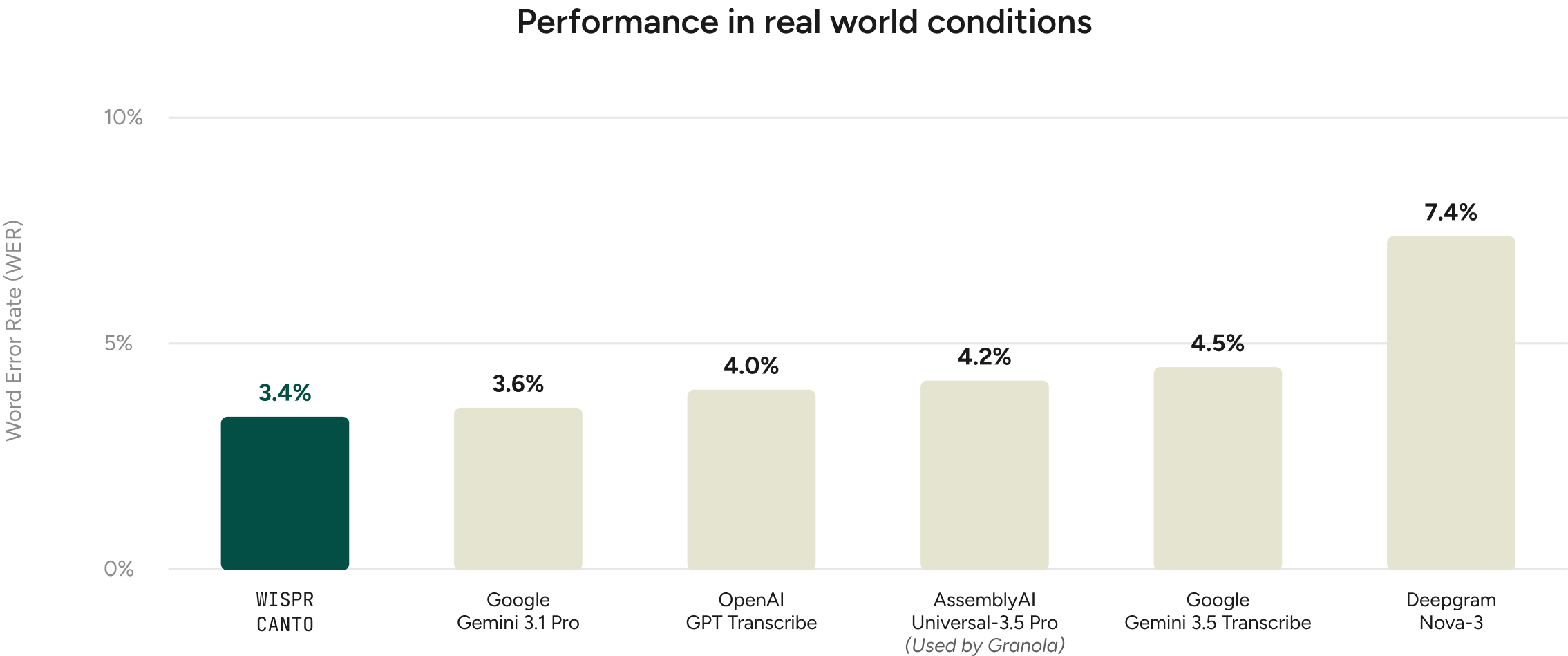
Wispr Flow lets lawyers dictate emails, case summaries, research questions, and drafts directly into the applications they use. On iPhone, dictation works through the Flow Keyboard; on Android, it uses the Flow Bubble. Smart Formatting handles punctuation and removes filler words, while Backtrack recognizes corrections made mid-sentence. The personal dictionary is especially useful for legal terminology and case names that conventional voice typing can struggle with. In Wispr Flow's evaluation of real-world dictations, its Canto speech recognition model made fewer word recognition errors than the other models tested, measured by how often words were incorrectly transcribed, missed, or added.
Wispr Flow Notetaker lets attorneys record permitted in-person conversations directly from their iPhones, generating transcripts and summaries they can revisit later. Lawyers handling multiple client matters can also search past meetings to retrieve specific details. Our guide to AI notetakers for lawyers explores meeting documentation in legal practice.
What users say:
“I spend a lot of time writing emails, researching law, working on our case law database, and drafting summaries and other materials, so anything that cuts down on the time I spend typing is useful.”
“I can talk through an idea for a case summary, dictate the main points I want to cover, or explain what I need help researching, rather than trying to write a perfect first draft from scratch.”
— Atreya M., Director of Legal Research, Small Business, 5/5, October 13, 2026, G2 review
Practical uses for lawyers:
- Dictate a client follow-up email immediately after a consultation, while the details are fresh.
- Talk through the key facts and arguments for a motion before developing the first draft.
- Add frequently used case names, opposing counsel names, and legal terminology to your personal dictionary.
- Dictate detailed instructions for a legal research assistant or AI research tool instead of typing a lengthy prompt.
- Record and transcribe permitted in-person meetings, including client consultations or internal case discussions, directly from an iPhone.
Wispr Flow dictation requires an internet connection. Lawyers should follow their firm's policies before entering confidential client information into AI tools and obtain appropriate consent before recording meetings. For more on voice typing in legal practice, see our guide to dictation for lawyers.
2. Clio – Best app for managing client matters
Clio is a legal practice-management platform with mobile apps for accessing client matters, calendars, documents, and billing information. Attorneys can record billable time, update matter notes, and review case-related tasks without returning to their computers. Solo practitioners can handle much of their administrative work through the app, provided their practice already uses Clio.
What users say:
I absolutely love Clio. As a new solo practitioner who practices in multiple counties and does appointed and conflict work, I couldn’t have asked for much more. I do wish the mobile apps had more of the desktop features, but it’s not a big deal. I can do most things on my iPhone or iPad and adjust when I get back to my desk. The app is clean, intuitive, and always works just how I expect. I am on the lowest tier so I can’t speak to any of the fancier tools or benefits, but I’m very pleased and won’t be leaving anytime soon. I tried free trials for others and they just didn’t have the fluidity and clean implementation Clio has.
— PerfectedInterest, 5/5, December 11, 2025, Apple App Store
Practical uses for lawyers:
- Review a client's matter history before an unexpected call or last-minute consultation.
- Record billable time immediately after a court hearing.
- Check upcoming court dates and task deadlines while traveling between appointments.
- Retrieve documents associated with a case when opposing counsel requests clarification.
- Update case notes after a hearing so colleagues can prepare the next steps.
Clio's mobile app doesn't reproduce every desktop feature. It's primarily a companion to the firm's existing Clio subscription, rather than a standalone productivity app.
3. TranscriptPad – Best app for reviewing deposition transcripts
TranscriptPad gives litigators a way to search, annotate, and organize deposition transcripts on an iPhone. They can highlight testimony, create issue codes, and mark passages for later review, even without an internet connection. Preparing for mediation? The iPad and Mac versions also support video synchronization and clips created from selected testimony.
What users say:
The ability to sync a video deposition is a welcome new feature. And the ability to create video clips from my designations is a time and money saver. I used to have to send this to a service provider and wait for the turnaround. Now I can create deposition video clips for mediations from my couch. Nicely done.
— Nilbud4, 5/5, July 7, 2023, Apple App Store
Practical uses for lawyers:
- Search a witness's deposition transcript for statements that contradict their expected trial testimony.
- Highlight admissions that support a motion for summary judgment.
- Organize deposition excerpts by issues such as liability, causation, or damages.
- Review testimony before mediation without carrying printed deposition transcripts.
- Create video clips from deposition designations for mediation presentations using the iPad or Mac version.
TranscriptPad is available only on Apple devices and requires a paid subscription after its trial. Advanced video editing requires an iPad or Mac rather than an iPhone.
4. Aderant iTimekeep – Best app for tracking billable hours
Aderant iTimekeep is built for legal professionals who record billable time against client matters. Attorneys can enter time and billing narratives directly from their phones, rather than reconstructing their work at the end of the day. Entries feed into supported law-firm billing systems, making iTimekeep useful for firms where attorneys frequently switch between matters.
What users say:
The simple and easy-to-use interface is by far the best part. Our billers have no issues learning and using the program. Its quick and more efficient to enter our time here than in our old system.
I do not appreciate the lack of single sign-on for the Outlook add-in. Single sign-on works great for the desktop and mobile app, but explaining to our users that they need a different password for the outlook add-in is hard.
— Verified User in Legal Services, Mid-Market (51–1,000 employees), 5/5, February 15, 2022, G2 review
Practical uses for lawyers:
- Record time spent on a client call before moving to the next matter.
- Enter billing narratives for drafting pleadings, researching case law, or reviewing discovery.
- Capture time spent preparing witnesses or attending settlement negotiations.
- Associate time entries with the correct client and matter to reduce billing corrections.
- Review unsubmitted time entries before the firm's billing deadline.
iTimekeep requires a compatible firm billing environment. Attorneys generally access it through their firm's software setup rather than purchasing it independently.
5. PDF Expert – Best app for reviewing and editing PDFs
PDF Expert lets attorneys read, annotate, and organize PDFs on an iPhone or iPad. Highlight contract provisions, add comments to pleadings, fill out forms, or sign documents without printing them. Paid features cover more extensive editing and redaction.
What users say:
For over 6 years I’ve been using this app & it has been a fantastic experience. There was a learning curve in the beginning but after that I’ve had nothing but positive experiences. Originally I bought PDF Expert to study & archive periodicals but it has become an integral part of my iPad life: keeping all of my scanned bits of paper & recipes organized, filling out online forms, even doing creative projects. And talk about customer service! If only all companies had their finesse! I’ve had to contact them 3 or 4 times with questions & not only do they write back promptly but the tone of the response is thoughtful & friendly. And I don’t know if it was just a coincidence but early on there was only a deep purple highlighter so dark to be almost unusable so I submitted a request for lilac. On the next update lilac was there! Now, of course, there are plenty of color options. Another time I wrote them because I couldn’t figure out how to do something & they wrote me back as if they had nothing better to do than help me. So impressed. With every update PDF Expert only gets better. Bravo to the Readdle team! Congratulations on many excellent products backed by a superior customer experience! Keep up the good work!
— BookGirl4Ever, 5/5, July 29, 2018, Apple App Store
Practical uses for lawyers:
- Highlight indemnification, termination, or liability provisions before a contract negotiation.
- Annotate draft pleadings with comments for an associate or paralegal.
- Review different versions of a contract to identify provisions requiring attention.
- Complete eligible PDF forms without printing them.
- Redact privileged or confidential information using supported paid tools before an authorized disclosure.
PDF Expert is available on Apple devices, not Android. Basic annotation is free, while attorneys who regularly edit or redact documents will need its premium features.
6. Expensify – Best app for tracking business expenses
Expensify tracks travel and business expenses without requiring lawyers to manually enter every receipt. Its SmartScan feature extracts details from photographed receipts, and its reporting tools organize expenses for reimbursement or accounting. Attorneys traveling for depositions, hearings, and client meetings can capture those costs as they occur.
What users say:
I use Expensify for work, and it has made managing and submitting expenses incredibly easy. The app is very user-friendly, and I love the AI integration, which saves me time by automatically capturing information and eliminating the need to manually enter details into my expense reports.
One area I wish could be improved is reporting metro rides. It would be much more convenient to have the option to submit multiple rides as a single lump sum rather than having to enter each commute individually.
Overall, it’s a great app that makes expense management simple and efficient!
— Rebeca, 5/5, October 30, 2026, Trustpilot review
Practical uses for lawyers:
- Photograph parking receipts and toll charges incurred while traveling to court.
- Track eligible mileage for client visits, depositions, and other work-related travel.
- Record airfare, hotel, and meal expenses from an out-of-state deposition or conference.
- Organize matter-related disbursements for reimbursement or client billing, subject to firm policy.
- Submit an expense report after a multi-day trial instead of sorting through paper receipts.
Expensify offers free functionality alongside paid business features. Attorneys must distinguish ordinary firm expenses from costs that can legitimately be charged to clients under their billing agreements and applicable professional rules.
7. Readwise Reader – Best app for organizing professional reading
Readwise Reader combines articles, newsletters, PDFs, and other reading materials in a searchable library. Lawyers can highlight passages, annotate documents, and listen to articles through text-to-speech. Rather than keeping legal commentary and regulatory updates scattered across browser tabs and emails, Reader brings that material together. It also syncs highlights with the broader Readwise system for later review.
What users say:
My main tool for collecting and organising knowledge. Readwise takes the highlights and notes from your reading and transforms them into a personal knowledge system. By syncing with Kindle, Raindrop.io, articles, and more, it surfaces key insights with daily reminders. I pair it with Raindrop.io to tag first, then refine and retain knowledge seamlessly.
— Terje Husby, Product Hunt review
Practical uses for lawyers:
- Save articles analyzing new judicial decisions relevant to your practice area.
- Organize regulatory updates and legal newsletters by industry or jurisdiction.
- Highlight commentary on a developing legal issue for later reference.
- Listen to saved professional reading during a commute.
- Retrieve previously highlighted analysis when preparing a client advisory or internal briefing.
Readwise Reader requires a subscription after its free trial. Lawyers who only save the occasional article probably don't need it. Confidential client documents should only be uploaded when firm policy permits.
8. Genius Scan – Best app for scanning documents
Genius Scan turns an iPhone or Android phone into a portable document scanner. It detects page boundaries, corrects perspective, and creates PDFs from photographed documents. Lawyers can scan paper records received from clients and export them into approved document-management systems, with text recognition available through paid features.
What reviewers say:
In short, Genius Scan Plus is good at capturing documents—not text. And plenty of the time, that's all the functionality we need. If OCR is a must-have, look elsewhere. But if an all-purpose document image capture engine is what you want, this is a great choice.
— PCMag, Genius Scan Plus review
The PCMag review covers an older version of Genius Scan Plus. OCR is now available through paid functionality, so its criticism of text recognition no longer describes the current product.
Practical uses for lawyers:
- Scan a signed engagement letter received during an in-person client consultation.
- Digitize paper correspondence or records provided by a client for a case file.
- Capture handwritten notes from a permitted meeting and save them as a PDF.
- Scan receipts for filing fees, service-of-process expenses, or other matter-related disbursements.
- Combine multipage paper documents into a single PDF for upload to an approved case-management system.
Basic scanning is free, while advanced features require payment. Firms should confirm that storage and export settings comply with their confidentiality and document-retention policies.
9. LawStack – Best app for accessing statutes and court rules
LawStack gives lawyers mobile access to federal statutes, regulations, and selected state laws and court rules. Attorneys can search provisions, bookmark frequently referenced material, and consult downloaded resources without an internet connection. It's a practical substitute for opening a full legal research platform when all you need is the wording of a procedural rule or statute.
What users say:
Decided to try as the idea of portable carry around law library was intriguing. Was not expecting much. I was completely blown away when I tried it. Terrific search capabilities. Very thorough. Great design and very easy to use. Working at home without VPN? LawStack! But the service is what makes it so indispensable. They get back to me almost immediately and have solved every issue I had quickly and easily. If I could give them 10 stars I would. Thanks for creating such a terrific tool for us.
— MiketheD, 5/5, March 26, 2020, Apple App Store
Practical uses for lawyers:
- Look up a provision of the Federal Rules of Civil Procedure before a court appearance.
- Check the language of a state statute while discussing a legal question with a colleague.
- Bookmark frequently referenced rules governing discovery, evidence, or appellate procedure.
- Consult downloaded statutory materials when internet access is unreliable.
- Verify the wording of a procedural rule before drafting a filing, then confirm that the source is current.
LawStack offers free reference materials alongside paid libraries and updates. Attorneys should verify that the relevant edition is current before relying on a saved statute or court rule.
10. Docusign – Best app for getting documents signed remotely
Docusign lets lawyers send, sign, and track electronic agreements from their phones. Its mobile app handles signature requests and notifications, eliminating the need to coordinate an in-person meeting for eligible documents. Docusign also offers CLM, a separate contract lifecycle management platform designed to automate more extensive legal contract workflows.
What reviewers say:
DocuSign CLM delivers significant ROI by reducing contract cycle times by up to 50%, enhancing compliance, and minimizing the risk of revenue leakage. By automating repetitive tasks and providing actionable insights, it allows legal teams to focus on strategic initiatives, ultimately driving increased productivity and profitability.
— Legal Tool Guide, Docusign CLM review
The review's ROI claims apply to Docusign CLM rather than the mobile signing app. The reported contract-cycle improvement reflects the broader platform's automation capabilities.
Practical uses for lawyers:
- Send engagement letters to prospective clients for electronic signatures.
- Collect signatures on settlement agreements and releases when electronic execution is legally appropriate.
- Request signatures on nondisclosure agreements before sharing confidential business information.
- Track outstanding signature requests for closing or settlement documents.
- Obtain signatures from multiple parties to an agreement without coordinating a physical meeting.
Recipients can sign through Docusign for free; sending agreements generally requires a paid plan. Attorneys should confirm that electronic execution is permitted for the particular document and jurisdiction.
Security considerations when using mobile apps for lawyers
A lawyer's phone may contain client correspondence, privileged documents, financial records, and information about ongoing litigation. Before installing an app that accesses this material, attorneys should understand how it handles sensitive data. The American Bar Association's guidance on lawyers' use of AI emphasizes that adopting new technology does not diminish lawyers' professional obligations to protect client information.
Four considerations deserve particular attention:
- Data storage and retention: Determine whether information is stored locally or in the cloud, how long the provider retains it, and whether records can be deleted or exported.
- App permissions: Review access to contacts, microphones, cameras, and files. A document scanner may need camera access, but shouldn't automatically receive permission to access unrelated client information.
- AI processing and confidentiality: Before using AI dictation, transcription, or research tools with client information, understand how that information is processed and who can access it. Check whether the provider uses submitted information for model training and whether its data-handling practices meet your firm's confidentiality requirements.
- Device and account security: Use strong authentication and enable multifactor authentication where available. Personal phones used for client work must meet the firm's security requirements. Firms should also have procedures for revoking access or remotely removing work data when a phone is lost or stolen.
Meeting recordings require additional attention. Consent laws vary by jurisdiction, and participation in a conversation does not automatically constitute permission to record it.
Frequently asked questions about mobile apps for lawyers
What apps should every solo practitioner have?
Solo practitioners need tools for managing client matters, communicating, billing, and handling documents. Clio covers practice management, Wispr Flow supports dictation and meeting notes, and Docusign handles eligible electronic signatures. Litigators may also need TranscriptPad, while transactional lawyers will generally have less use for it.
Can lawyers use AI dictation apps for confidential client information?
Yes, provided the tool's data-handling practices meet the lawyer's professional obligations and the firm's security requirements. Attorneys should evaluate the provider before entering privileged or confidential information and review dictated text for accuracy before sending it to clients or submitting it to a court.
For a broader discussion of responsible AI adoption, see our guide to how lawyers can use AI.
Which apps for lawyers work offline?
TranscriptPad supports offline transcript review, while LawStack provides access to downloaded legal reference materials. PDF Expert and Genius Scan also support certain local document tasks without a continuous internet connection. Cloud synchronization and sharing may still require connectivity, and Wispr Flow dictation requires internet access.
Are free legal apps reliable enough for professional work?
Free apps can handle tasks such as document scanning and basic PDF annotation. Lawyers should evaluate how frequently the software is updated, what features are restricted, and whether its security practices meet firm requirements. Legal reference apps also need current statutes and court rules, which may require a paid subscription.
Make your phone more useful for legal work with Wispr Flow
After a client consultation, a lawyer may have follow-up emails to send, research questions to investigate, and notes to add to a case file. Those tasks often get postponed until there's time to sit at a computer.
Wispr Flow lets attorneys dictate that material into their preferred apps while the details are fresh. Smart Formatting cleans up spoken text, Backtrack handles mid-sentence corrections, and the personal dictionary recognizes specialized legal terminology.
With Wispr Flow Notetaker on iPhone, attorneys can also record permitted in-person conversations, generate transcripts and summaries, and retrieve important details afterward. Recording remains subject to applicable consent requirements and firm confidentiality policies.
Wispr Flow offers plans for individuals and teams, including larger legal practices.
Explore Wispr Flow for lawyers