
Speech-to-text: how AI dictation works and evolves

Speech-to-text (STT) technology combines two capabilities: speech recognition, which identifies words from sound, and language understanding, which uses context to resolve ambiguities like "their" versus "there." Advances in AI have improved both, so dictation apps now perform even in imperfect conditions such as background noise or whispering, and its grasp of context has deepened.
As ongoing voice-to-text innovation sets new benchmarks in what's possible, there is a growing chasm between industry leaders and the baseline dictation tools built into most devices.
How AI speech-to-text works nowadays
How speech recognition turns sound into finished text
Every dictation passes through three stages before text appears on screen.
- Capturing the audio. Your microphone records what you say once you press your shortcut. Clear, close audio gives every later step a better starting point.
- Turning sound into words. A speech recognition model, such as Canto, matches the sounds to the most likely words. It can draw on context, including your personal dictionary and, if you allow it, limited text from the app you're dictating into.
- Cleaning up and formatting. A language model removes filler words, applies your corrections, adds punctuation and shapes the output into sentences, paragraphs or lists.
Dictation used to type exactly what it heard
Earlier dictation treated speech as something to copy down. It recorded each word in the order you said it, so a quick note like "send it to Mark, no, Maria" came out with both names in it.
Speech models already get most words right in clear audio. The harder problem is audio that could reasonably be heard more than one way. As Wispr Flow CTO Sahaj Garg explains in his overview of speech recognition challenges, better word recognition alone does little there. What helps is context: knowing who is speaking, which app they're in and which names they use.
How much speech-to-text apps have improved
The speech model behind Wispr Flow, Canto, comes with published figures for each of these gains. Wispr's own research lab trained it on real dictations rather than studio recordings.
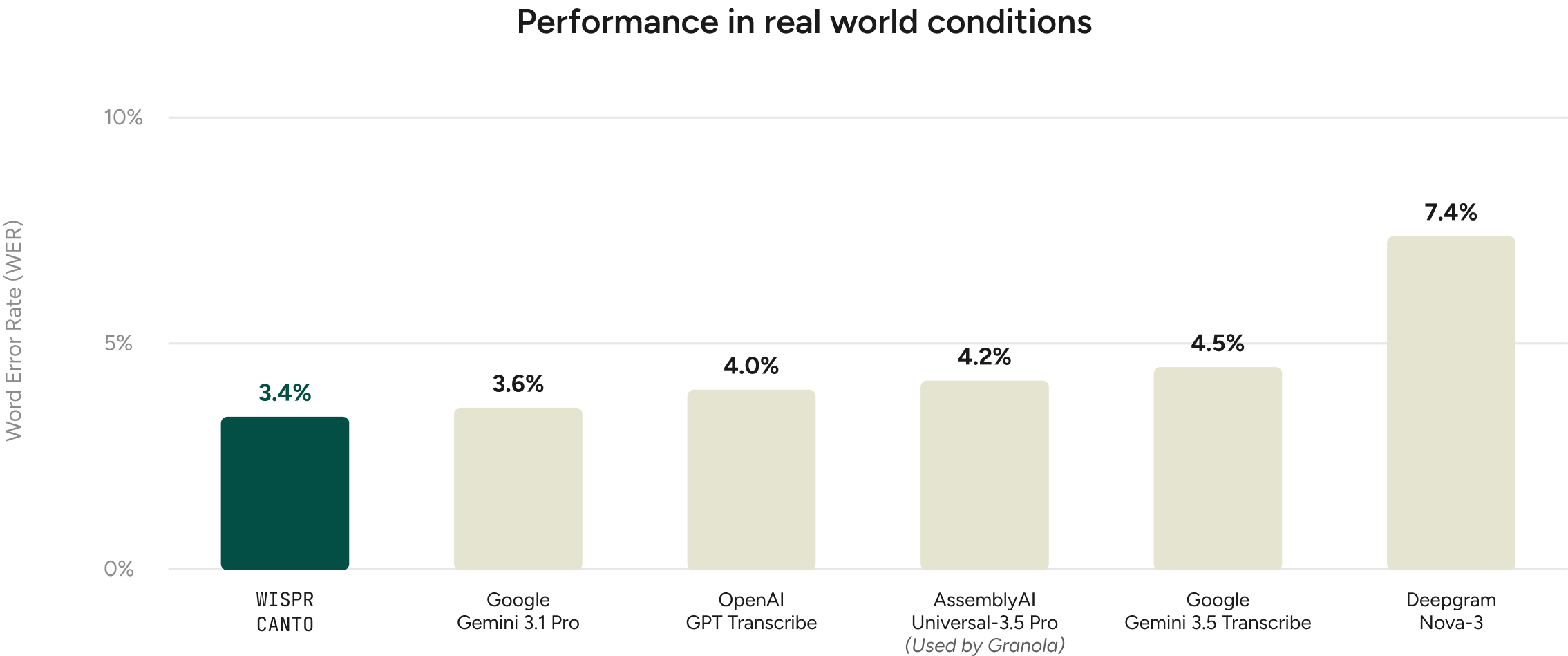
- Accuracy. Testing shows that a 3.4% word error rate on real-world dictation is the new benchmark for accuracy. Wispr Flow's Canto model set it, ahead of models from Google, OpenAI, AssemblyAI and Deepgram.
- Difficult audio. Even with background noise, whispering and one- or two-word replies, real-time dictation can now hold errors to 9.1%. Canto reached that mark, the lowest among the real-time models tested.
- Fewer fixes. Dictation now lands right the first time more often. After Wispr Flow launched its own model, Canto, desktop users fixed 13% fewer dictations.
- Less waiting. Polished text can now appear in well under a second. Since Canto launched, dictations taking longer than a second fell 54% on desktop and 37% on mobile, against Wispr Flow's target of under 700 milliseconds.
- Independent testing. Text you can send without editing is now the norm. On Voice Arena's independent Dictation Bench, 79.4% of drafts were ready to send as is, the top result among 10 Mac dictation apps, achieved by Wispr Flow.
- Strong uptick in usage. Arguably, the strongest signal of a good product is how much users come to rely upon it. Since launching Canto, Wispr Flow observed 7% more words dictated per day among users.
Where speech-to-text errors come from
Context is where speech recognition can still fall short
Even with clean audio, AI dictation can still pick the wrong word. Sahaj Garg's write-up of the challenges in speech recognition research collects real examples from Wispr's internal use:
- Names: "Hey Lauren" when the speaker meant "Hey Laurent." In a clip that short, either name fits the audio.
- Titles and brand names: "diarivus" for the podcast "Diary of a CEO."
- Whispered speech: "Spuria's background" for "spurious background."
- Mixed languages: "哈哈" when the speaker meant "Ha Ha" in English.
- Back-to-back numbers: "gabapentin 903 times a day" when a doctor meant "900 3 times a day."
Every one of these mistakes fits the audio. What the model lacked was the context a person would use to pick the right word. That's why Wispr treats recognition as a context problem, drawing on the app you're using, the topics you talk about and the names you use, not just the waveform. It's also why Wispr Flow keeps innovating, determined to beat the industry benchmark it set for voice-to-text accuracy.
Your mic and language settings affect AI dictation accuracy
Built-in laptop and phone mics work well with Wispr Flow, and a mic closer to your mouth lets you speak more quietly. Wispr recommends against AirPods and other Bluetooth earbuds for dictation: they can be slow to connect, clip your first word and produce more errors than wired options. Picking your mic directly in the app, rather than leaving it on auto-detect, also helps. The microphone guide covers setups for shared offices and whispering.
Wispr Flow can also detect which language you're speaking, but selecting the one you're using at that moment gives better accuracy. The language picker sits in the Wispr Flow bar, so switching takes one click.
What AI dictation is capable of today
Rambling speech becomes clean writing
Wispr Flow's AI dictation removes filler words, adds punctuation and formats as you speak, including lists and paragraphs. You can pause, ramble or restart a thought, and the result reads like something you wrote rather than something you said.
Mid-sentence corrections replace what came before
People change their minds while they talk. Say "book the room for Tuesday, actually make that Wednesday" and Wispr Flow writes "Book the room for Wednesday." The correction replaces the original instead of sitting next to it.
Dictation learns your names and jargon
Wispr Flow picks up names, acronyms and jargon automatically, and you can add words to a personal dictionary. Canto is post-trained to use that personal context, so the vocabulary it learns from your corrections and dictionary entries improves later dictations.
Canto doesn't follow your dictionary blindly. When a dictionary name sounds close to what you said, Canto weighs it against what the audio supports, so a "Barry" in your contacts doesn't turn a berry salad into a Barry salad.
One AI dictation tool for all sites and apps
Wispr Flow's dictation works anywhere you type, with no plugins or integrations: email, chat, documents, code editors and AI prompts. It runs on Mac, Windows, iPhone and Android, and syncs across them.
Tone adjusts to each app
Wispr Flow adapts its writing style to the app you're in, so the same thought comes out polished in an email and relaxed in a chat. Apps fall into four categories, personal messages, work messages, email and everything else, and you choose a style for each: formal, casual, excited, or very casual for personal messages. Very casual drops capital letters and some punctuation, while the email category adds email formatting such as greetings, sign-offs and line breaks.
Spoken shortcuts expand into saved text
Snippets cover the things you type over and over. Speak a shortcut and Wispr Flow expands it into saved text, such as a link, an address or a bio.
Voice-to-text capabilities extend to more than 100 languages
Wispr Flow's AI dictation supports 100+ languages, so people who write in more than one can keep dictating when they switch. Accents add difficulty here, since a strong accent can lead a model to think you've changed languages entirely. Selecting only the language you're speaking avoids that.
Speech-to-text security: where your words go
Dictation often includes names, client details and other sensitive information, so how a tool handles your audio matters. Wispr Flow transcribes in the cloud. Every request travels over TLS 1.2+, and anything stored is encrypted with AES-256. Audio is deleted once it's transcribed unless you've turned on dictation cloud storage, and with that setting off, your dictation history stays on your device.
Wispr never sells your data. A setting called "Improve the model for everyone" decides whether your audio, transcripts and edits can help train Wispr's models; switch it off and nothing you say is used for training. Wispr's third-party AI providers can't train on your data either way. A separate context awareness setting controls whether Wispr Flow reads limited text from the app you're in to get names right.
Wispr Flow is SOC 2 Type II and ISO 27001 certified, both audited by A-LIGN. For healthcare teams, it's HIPAA-ready with a signed BAA on the Growth and Enterprise plans. The privacy page walks through each control.
Comparing speech-to-text apps? Here's what to look for.
Use this checklist to test any speech-to-text app before you commit to it:
- Accuracy on real speech. Look for results on everyday dictation, including noisy rooms, short replies and names, not only clean, read-aloud benchmarks. The useful measure is how often you'd need to edit before sending.
- Cleanup and corrections. Filler removal, punctuation, formatting and mid-sentence corrections decide whether the output is ready to send or needs a second pass.
- Works anywhere you type. Some dictation lives inside one app or one ecosystem. Check that it works in every text field you use, from email to AI prompts.
- Platforms. If you move between a computer and a phone, or between Mac and Windows, confirm each is covered and that your dictionary follows you.
- Live text or finished text. Some apps show words as you speak, so you can watch them land. Others, including Wispr Flow, show the finished text once you stop, after cleanup. Pick the one that suits how you work.
- Where your audio is processed. On-device processing can work offline and keeps audio local. Cloud processing, which Wispr Flow uses, allows larger models but needs a connection. Either way, check how audio is encrypted and how long it's kept.
- Training and data controls. Check whether you can keep your dictation out of model training, whether your data is ever sold, and which certifications and agreements, such as SOC 2 Type II, ISO 27001 or a HIPAA BAA, are available.
- Languages and accents. Confirm your languages are supported and that the app handles your accent and any switching between languages.
- Free tier and pricing model. Free tiers, subscriptions and one-time purchases all exist. Test on your own voice before you pay.
- Team controls. For a company, look for shared vocabulary, admin settings and single sign-on.
- Accessibility. If typing is difficult or painful, accuracy matters even more, because every fix means going back to the keyboard.
For a side-by-side look at specific apps, see the full comparison of dictation apps.
Get to know Wispr Flow's Dictation
Designed for individuals and teams alike
Wispr Flow is built for one person dictating on a phone and for a company rolling it out across every desk. Individuals can start free on Mac, Windows, iPhone or Android, while teams can share a dictionary and snippets, manage members from an admin portal and sign in with single sign-on. Setup takes minutes, the accuracy holds up in noisy and quiet settings alike, and the same tool works across every app, which makes Wispr Flow a fit for almost anyone, whether they're students or parents, doctors or corporate teams.
Wispr Flow's dictation has earned its share of high-profile fans. Professionals at Microsoft, Amazon, Notion, Klarna, Vercel and Mercury use Wispr Flow, along with names like Steven Bartlett, host of Diary of a CEO, and Dave Gilboa, CEO of Warby Parker.
What sets Wispr Flow apart from other speech-to-text AI apps
- Accuracy on real-world speech. Wispr Flow runs on Canto, an in-house speech model that reached a 3.4% word error rate on real-world dictation. That was the lowest of six models in Wispr Flow's testing, which included models from Google, OpenAI, AssemblyAI and Deepgram. Canto is also trained to use your personal context, so the names and terms Wispr Flow learns from your corrections and dictionary make later dictations more accurate.
- Drafts ready to send. On Voice Arena's independent Dictation Bench, 79.4% of Wispr Flow's drafts were ready to send without edits, the top result among 10 Mac dictation apps.
- Two tools, one plan. Every Wispr Flow subscription, including the free plan, comes with both dictation and Wispr Notetaker at no extra cost.
- Meeting notes included. Wispr Notetaker turns meetings into transcripts with speakers named, summaries organized by topic and next steps. It works across Zoom, Google Meet, Microsoft Teams, Slack huddles and in-person conversations, with no bot joining the call.
Free to start, on every device
Wispr Flow is free on Mac, Windows, iPhone and Android, with no trial countdown and no credit card required. The free plan includes dictation in 100+ languages, the personal dictionary and snippets, and limited access to Wispr Notetaker, with a weekly limit on words. When you need more, the Pro plan removes the dictation limit, and students get 50% off, with discounts for educators and non-profits too. Full details are on the pricing page.
FAQ About Wispr Flow speech-to-text AI
How is Wispr Flow different from built-in dictation?
Built-in dictation transcribes what you say word for word, including filler words, false starts and mid-sentence corrections, so the cleanup is left to you. Wispr Flow's AI dictation removes filler words, adds punctuation, formats lists and paragraphs, and keeps only your final version when you correct yourself, so "can you tell the team the launch is gonna slip to, like, not Friday, the following Monday" becomes "Can you let the team know the launch is slipping to Monday?" It also learns your names, acronyms and jargon over time, and works the same way on Mac, Windows, iPhone and Android.
How does Wispr Flow make sure my information is safe?
Wispr Flow never sells your data. Audio travels over TLS 1.2+, anything stored is encrypted with AES-256, and audio is deleted once it's transcribed unless you turn on dictation cloud storage. A setting called "Improve the model for everyone" controls whether your dictation can help train Wispr Flow's models; with it off, nothing you say is used for training, and Wispr Flow's third-party AI providers can't train on your data either way. Wispr Flow is SOC 2 Type II and ISO 27001 certified, and HIPAA-ready with a signed BAA on the Growth and Enterprise plans, where admins can set the training policy for the whole team.
Does Wispr Flow work in every app?
Yes. Wispr Flow types wherever your cursor is, so it works anywhere you can type, with no plugins or integrations to set up. That includes Gmail, Slack, iMessage, Notion, code editors, the terminal and AI tools like ChatGPT, Claude and Cursor, on Mac, Windows, iPhone and Android.
What model does Wispr Flow use?
Wispr Flow runs on Canto, a speech model built in-house by the Wispr Advanced Interfaces Lab and trained on real dictations rather than clean studio recordings. At launch, Canto had the lowest word error rate on real-world dictation of the six models Wispr Flow tested, at 3.4%, a comparison that included models from Google, OpenAI, AssemblyAI and Deepgram. Canto replaced an earlier setup that ran several speech recognizers on every dictation, which cut waiting time, and its successor is already training at more than ten times Canto 1's scale.
Does Wispr Flow need internet for dictation?
Yes. Wispr Flow transcribes in the cloud, so dictation needs an internet connection; according to Wispr Flow, cloud transcription is what lets it deliver its speed and accuracy. Your audio is sent over an encrypted connection, turned into text and then deleted, unless you've turned on dictation cloud storage.
Is Wispr Flow always listening?
No. Wispr Flow only captures audio after you press your dictation shortcut, and nothing is recorded before that. Once your words are transcribed, the audio is deleted unless you've turned on dictation cloud storage, and you can choose to keep your dictation history on your device, auto-delete it after 24 hours or never save it at all.